


An ISF rejected by U.S. Customs and Border Protection (CBP) is a filing error that occurs when an Importer Security Filing fails validation in CBP’s Automated Commercial Environment (ACE). These rejections usually result from data mismatches such as incorrect bill of lading numbers, missing manufacturer information, or Harmonized Tariff System (HTS) classification errors.
Time becomes critical at this point, as a shipment without an accurately filed ISF can expose the importer to liquidated damages if the filing requirements under the Importer Security Filing rule (commonly called the “10+2 rule”) are not satisfied.
Key Takeaways:
- You or your customs broker must transmit your Importer Security Filing (ISF) electronically before your goods are loaded onto their shipping vessel.
- CBP requires ten importer-provided data elements plus two carrier-provided elements for containerized ocean shipments.
- Many ISF rejections stem from simple data mismatches or missing required elements.
- Importers must update ISF information if more accurate data becomes available before arrival in the United States.
- Prompt correction of rejected ISFs reduces the risk of enforcement penalties and cargo inspections.
Find out how to fix ISF rejections and learn about the errors that cause them.
What “ISF Rejected” Actually Means
The ISF is a document required for ocean freight entering the United States. The document is transmitted to CBP through the Automated Broker Interface (ABI) or Automated Commercial Environment (ACE) system.
The transmission may be rejected if any of the data elements are missing or erroneous. There are three possible status types CBP applies to Importer Security Filings.
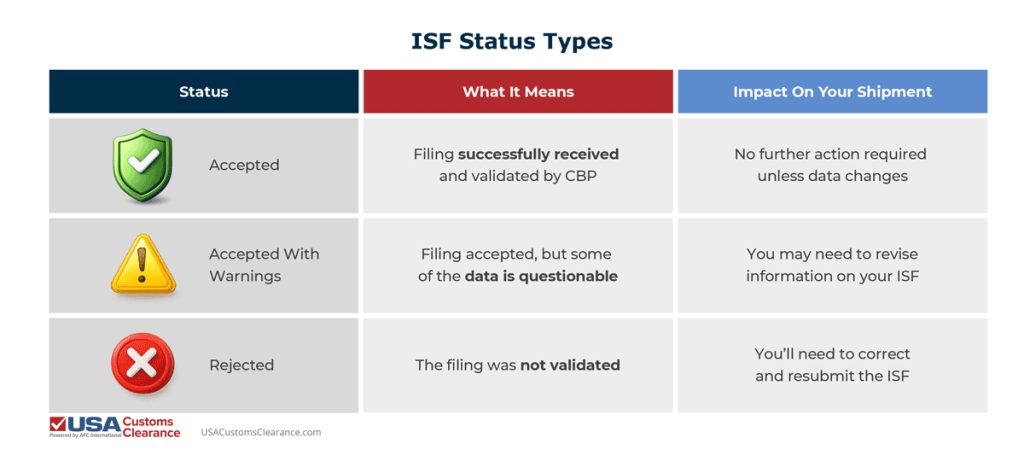
Rejection notices will appear in the ACE portal, or you may receive the notification from your customs broker. These system responses usually include a specific rejection code identifying the problematic data element.
Fast Diagnosis: The 10 Most Common ISF Rejection Causes
While dozens of data errors can trigger a rejection, ten issues account for the majority of ISF failures. Understanding each is essential for clearing shipments that are entering the U.S. by ocean vessel.
1. Bill of Lading (BoL) Number Mismatch
The bill of lading (BoL), is a document that serves as proof of shipment and evidence of the carriage contract. In some cases, it may even serve as the document of title for the imported goods. However, an incorrect BoL is one of the most common sources of ISF errors.
Some typical problems are:
- Standard Carrier Alpha Code (SCAC) Mismatch: The SCAC is a two-to-four letter code used to identify transportation companies on a BoL
- Confusion between house bill of lading (HBL) and master bill of lading (MBL): The HBL is issued to importers by a freight forwarder or non-vessel operating common carrier (NVOCC) and the MBL is issued by the carrier.
- Transposed characters: Number, letter, and alphanumeric combination errors can halt your shipment.
- Extra spaces or punctuation: Correct use of spaces and punctuation ensures your information isn’t confused by CBP systems.
Even a single incorrect character can prevent the ISF from matching the carrier’s manifest.
2. Manufacturer / Supplier Name Errors
CBP requires the name and physical address of the manufacturer or supplier associated with the goods.
Common supplier name errors include:
- Missing street address
- Listing only a P.O. box rather than a physical location
- Listing a trading company instead of the actual manufacturer
Always double check the contact information of you and your supplier to ensure it’s correct.
3. HTS Number Errors
The HTS is a product classification system used to assign tariff codes to imported goods. The commodities you’re bringing into the country must be linked to their correct HTS classification numbers at the six-digit level or greater.
HTS errors that can cause your ISF to be rejected include:
- Fewer than 6 digits
- Nonexistent HTS numbers
- Improper formatting
- Using an incorrect HTS code to classify merchandise
Correct classification of imported goods is a challenge for many importers, which is why businesses often choose to partner with a licensed customs broker experienced in the application of the General Rules of Interpretation.
4. Importer of Record (IOR) Number Issues
The Importer of Record (IOR) is the owner, purchaser, or licensed agent that’s legally responsible for ensuring imported goods comply with all relevant laws and regulations. The IOR number identifies the entity responsible for duties and regulatory compliance.
It can be your:
- Employer Identification Number (EIN)
- Social Security Number (SSN)
- CBP-assigned number
Common IOR number issues range from mismatched EINs to the importer not being registered at all.
5. Consignee Data Errors
A consignee is an individual, company, or entity that’s been designated to receive imported goods at the final destination. The consignee number must correspond to the U.S. party receiving the goods.
Frequent problems include:
- Invalid IRS number
- Address mismatches
- Incorrect corporate entity
6. Container Stuffing Location Missing or Late
The stuffing location identifies the physical place where the container was packed.
While this element has flexible timing requirements, it must still be submitted before arrival in the United States.
Missing this data can trigger rejection or warning messages.
7. Consolidator (Stuffer) Information Missing
A consolidator or stuffer is an entity that’s responsible for combining smaller shipments into a larger one by optimizing space inside a container. CBP also requires the name and address of the party who stuffed the container or arranged the stuffing.
This data often comes from freight forwarders or consolidators.
8. Duplicate ISF Filing
Duplicate filings are when CBP receives two or more filings for the same ocean shipment using identical BoLs and importer numbers.
Duplicate filings occur when:
- Both broker and forwarder submit an ISF
- A system retransmits the same filing automatically
Duplicate ISFs can cause data conflicts and rejection responses.
9. ISF Filed Against Wrong Vessel / Voyage
ISF’s must have the correct vessel and voyage information to be valid.
If the ISF references an incorrect:
- Vessel name
- Voyage number
- Sailing date
CBP systems may reject the filing because they cannot match the cargo manifest.
10. Timing Violation
An ISF must be submitted no later than 24 hours before cargo is loaded onto a vessel. Timing violations are among the most serious issues, as they can result in $5,000 of liquidated damages per violation.
Examples include:
- Filing after cargo is already loaded
- Updating ISF information too late
- Submitting data after the vessel arrives in the United States
Any of these issues can lead to an ISF rejection, but the errors can be corrected in many circumstances.
Fix Your ISF Fast: Step-by-Step Correction Workflow
When an ISF rejection occurs, the fastest solution is a structured troubleshooting approach.
Step 1: Confirm the Exact Error Code
Start by retrieving the rejection message from the ACE portal.
Identify:
- The data element causing the rejection
- The error code
- The line item involved
Purpose:
This step ensures you know exactly what failed, where it failed, and what must be corrected before resubmission.
Step 2: Determine Whether to Amend or Cancel & Refile
Some corrections can be handled with a simple amendment.
Amendment works when:
- Correcting minor spelling errors
- Correcting an address
- Updating HTS codes
Cancel and refile are required when;
- Duplicate ISF filings exist
- The wrong bill of lading number was used
- Filing is associated with an incorrect shipment
Purpose:
The purpose of this step is to help you choose the proper correction method based on the error you made. This ensures your ISF is updated accurately and linked to the correct shipment.
Step 3: Coordinate with Carrier / Forwarder
Many ISF errors originate upstream in the importer supply chain.
Confirm the following with your partners:
- Correct Bill of Lading
- Container numbers
- Vessel name and voyage
- Stuffing location
- Consolidator information
Purpose:
The purpose of this step is to verify critical shipment details with supply chain partners so the ISF reflects the correct cargo movement and is not rejected by customs authorities.
Keep in mind that filing your ISF past the deadline can result in fines of up to $5,000.
How to Prevent ISF Rejections (Pre-Submission Checklist)
Before transmitting an Importer Security Filing, verify the following:
- Bill of lading matches the carrier manifest exactly
- Manufacturer address is a physical location and not a P.O. Box
- HTS classification provided at minimum six digits
- Importer EIN matches CBP records
- Consignee data matches entry documentation
- Container stuffing location confirmed
- Consolidator information verified
- Vessel and shipping lane validated
When time is of the essence, partnering with a customs broker to review and correct Importer Security Filings that are rejected by CBP.
Fix Your Rejected ISFs With Help From USA Customs Clearance
A rejected Importer Security Filing can quickly turn into a customs hold, shipment delay, cargo exam, or a costly compliance issue if it isn’t corrected immediately. Working with a licensed customs broker helps importers identify the cause of the rejection, correct the filing, and coordinate with carriers and forwarders so the shipment continues moving through the supply chain.
At USA Customs Clearance, our licensed customs brokers work directly with importers, freight forwarders, and carriers to diagnose ISF errors and transmit corrected filings through CBP’s ACE system as quickly as possible.
What We Do: Our customs brokers help importers resolve rejected Importer Security Filings and reduce the risk of penalties or shipment delays by providing:
- ISF Rejection Diagnosis: We review ACE rejection messages, identify the exact data element causing the failure, and find out if the issue requires an amendment or a full cancellation and resubmission.
- Importer Identity and Registration Verification: Our team confirms the Importer of Record number, verifies name-control alignment with IRS records, and ensures the importer has the required CBP Form 5106 registration on file.
- HTS Classification Review: We verify that the HTS number submitted in the ISF meets the six-digit minimum requirement and correctly classifies the product.
- ISF Amendment and Retransmission: Once the correct information is verified, we amend the filing or cancel and resubmit the ISF electronically through the ACE portal.
Typical Timeline: Once we receive the shipment details and rejection notice, our team can determine the issue and coordinate corrections with your logistics partners to resolve the filing quickly.
What You’ll Need: To troubleshoot a rejected ISF, importers should provide:
- Bill of lading number
- Commercial invoice and packing list
- Supplier or manufacturer information
- HTS classification (if known)
- Importer of Record EIN or CBP number
- Vessel name and voyage number
- Container numbers (if available)
Why Work With Licensed Customs Brokers:
Licensed customs brokers understand CBP data validation rules and ISF filing procedures. When an ISF is rejected, that experience allows them to quickly isolate the problem and correct information before the shipment’s arrival window closes.
If your ISF has been rejected or flagged with warnings, our team can help you correct the filing and keep your shipment (and your business) moving forward. Call us at (855) 912-0406 or reach out to us on our contact page to get started!

 Copy URL to Clipboard

Did you find this article helpful?
See more of our coverage on Google.
Add usacustomsclearance.com as a preferred source!

Add usacustomclearance.com as a preferred source!
See more of our coverage in Google's Top Stories.

Add your first comment to this post